
My AI-enabled Process to Make a Marketing Lead Magnet in an Afternoon
I went down a rabbit hole so you don’t have to.
I’m going to give you fair warning before we start. The process I went through to make this lead magnet was really (really) geeky. We’re talking turning the dial up to an eleven on the geek-o-meter. I needed to do this because of the massive amount of data I need to process to make some new prompts—which were core to the lead magnet itself. You probably aren’t going to run into this problem—heck 99% of the time I don’t either—so my deep dive down the rabbit hole of local LLMs is probably more than a little overkill for you.
That said, the rest of this workflow isn’t technical at all, the whole workflow can be done with almost any AI tool. I’ll share the why I did what I did, because it shows how powerful these tools are becoming for marketers—and maybe inspire you to push outside of your tech comfort zone.
Making a customer-informed lead magnet in an afternoon
Here’s how it started, I needed a lead magnet.
I have a number of virtual AI personas that I use to develop marketing content, bounce ideas off of, and try to understand customers better without needing to bug real people constantly (I’ll explain the process I use to create these personas in another post).
I was working on top-of-funnel (TOFU) questions with a couple of these personas and both of them suggested the same thing: “Give us an AI-related ebook. A quick download. Some prompts I can use day-to-day.”
Something value-added. Something useful. Something easy.
I thought to myself, “I have hundreds of prompts stored in Notion that I’ve been collecting over the past nine months, maybe I could use those as starting points.”
I didn’t want to just copy-paste the prompts into an ebook—some are my original work and a lot are collected—but within those 300+ prompts, there is a lot of great structure for how a good prompt should be made. The problem? How do I mine that massive amount of content to generate new, original marketing prompts? The sheer number of prompts—each in its own file—far and away exceeds the upload limits Gemini or NotebookLM. Could I have merged all the files together into a single, massive file? Yes, but part of this whole process was that wanted to see how easily I could tap into large amounts of data stored locally on my machine—something I might need to work with client data.
Step 1: The “Geeky” Part (Building a Local Dataset)
My first step was to ask Gemini how to make all this data usable for an AI model without too much programming or lots of API calls. The answer was pretty long and, frankly, pretty geeky. The bottom line was the easiest way would be to use the AI tools I had installed on MacBook already—AnythingLLM and LM Studio.
Turns out AnythingLLM is really great at handling really large, local data sets. Its RAG (Retrieval Augmented Generation) tools are easy to use and pretty efficient. A RAG gives an AI a specific library of content—in my case, prompts—to tap into for answers and insights. Here’s how that whole setup went:
- The Data: I exported my entire Notion database of prompts. Thankfully, Notion exports to Markdown, which is the native language of LLMs. Perfect.
- The Tools: AnythingLLM is fantastic at building a vector database (the RAG). It organizes everything into “workspaces.” Adding the files was as simple as…here add this folder to the workspace. I tried using AnythingLLM on its own and pairing it with LM Studio. The pairing setup worked much better for being able to switch and test different models on the fly (but AnythingLLM alone would have been fine).
- The Model: I went down a rabbit hole here—do I use Google’s Gemma? Mistral? DeepSeek? I’ll spare you the details, but I tried several models to see which one gave me the best balance of speed and creativity. While that’s a post for another day, suffice to say throwing the same prompt at different models is really interesting. But I digress…
So, I had my data in a RAG, a local vector database, and a powerful model ready to read it. The next step was my prompt. Something simple, clean, and straightforward to get content to work with.
Step 2: Mining the Gems
The next step was starting with a basic prompt:
You are an expert Prompt Engineer. You have access to a library of high-quality prompts in the provided documents.

Your Goal: Create NEW prompts for a Lead Magnet PDF. Constraint: Do NOT copy the text of the existing prompts. Action: Analyze the structure of the prompts in the context (e.g., ‘Act as [Role]’, ‘Use [Framework]’). Then, generate 5 BRAND NEW prompts using those same structures but target marketers.

Prompts for:
- generating better email copy
- generating better LinkedIn posts
- generating newsletter ideas from a blog post
- checking content so it’s not generic or sounding like an AI
- Reviewing emails for “when someone would stop reading and delete” that also provide fixes
I ran the prompt three different times using a few different models and I ended up with about 15 or 20 solid prompts. I took those, pasted them into my text editor, and whittled them down to the five I really liked then edited them to give them some more polish.
Step 3: The Validation Loop (Millie the Marketer)
This is the part that isn’t geeky, but is essential. I took those five refined prompts and went back to my AI personas. I said, “I’ve written these prompts with you in mind. What do you think of them?”
Note that I didn’t ask “Do you like them?” That’s a leading question. I asked, “What do you think?”
They told me. They gave actual feedback: If you do it like this, I’ll understand it better. Get rid of this insider language. This wording throws me off.
I took that feedback, made the tweaks, and suddenly I had a really solid outline I could work from for the next stage: making the document.
Step 4: Making the Document (Gamma FTW)
I took that text file of prompts—structured in Markdown—and used Gamma to turn it into a really great looking document. Gamma has built-in templates for documents, presentations, social posts, and websites.
I used the “Paste in Text” option for Gamma and told it to “Generate content from notes or outline.”
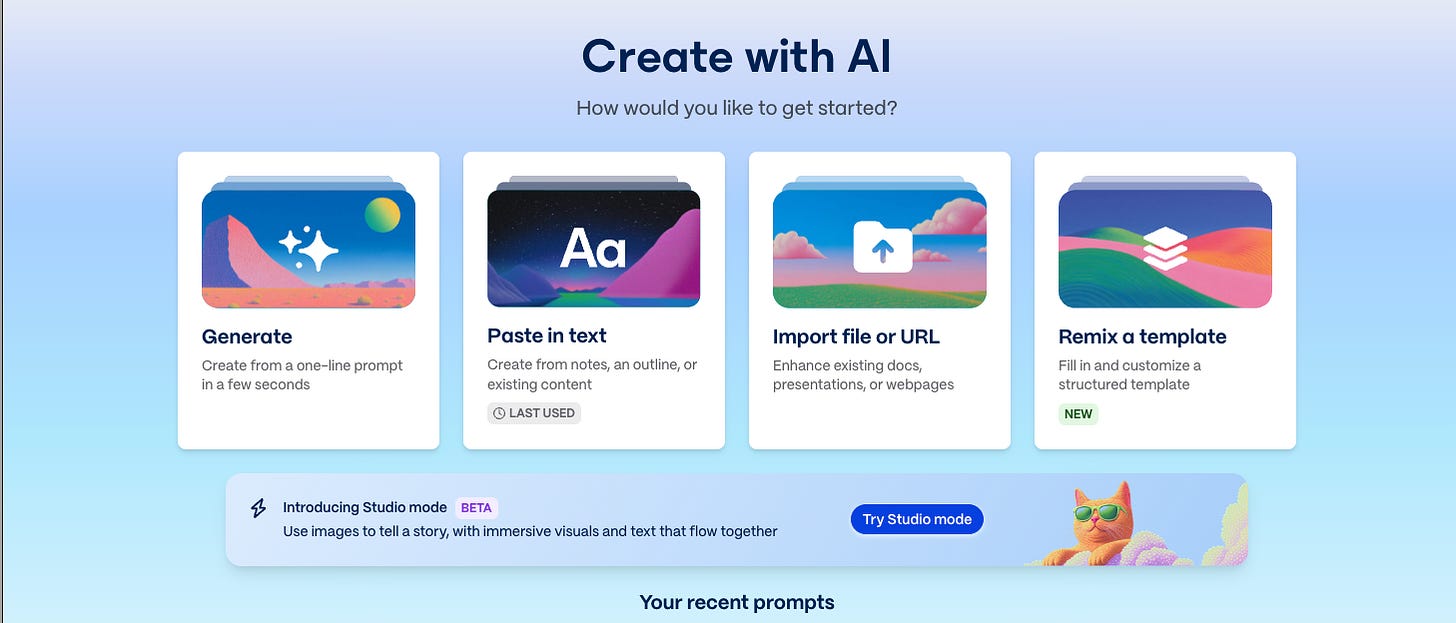
On the next screen I picked the theme, creating the document card-by-card (in this case card = page), and how much text I wanted on the page. Then clicked “Generate.” It’s always truly amazing to watch Gamma do its thing. Watching text, layouts, and images appear in front of me.
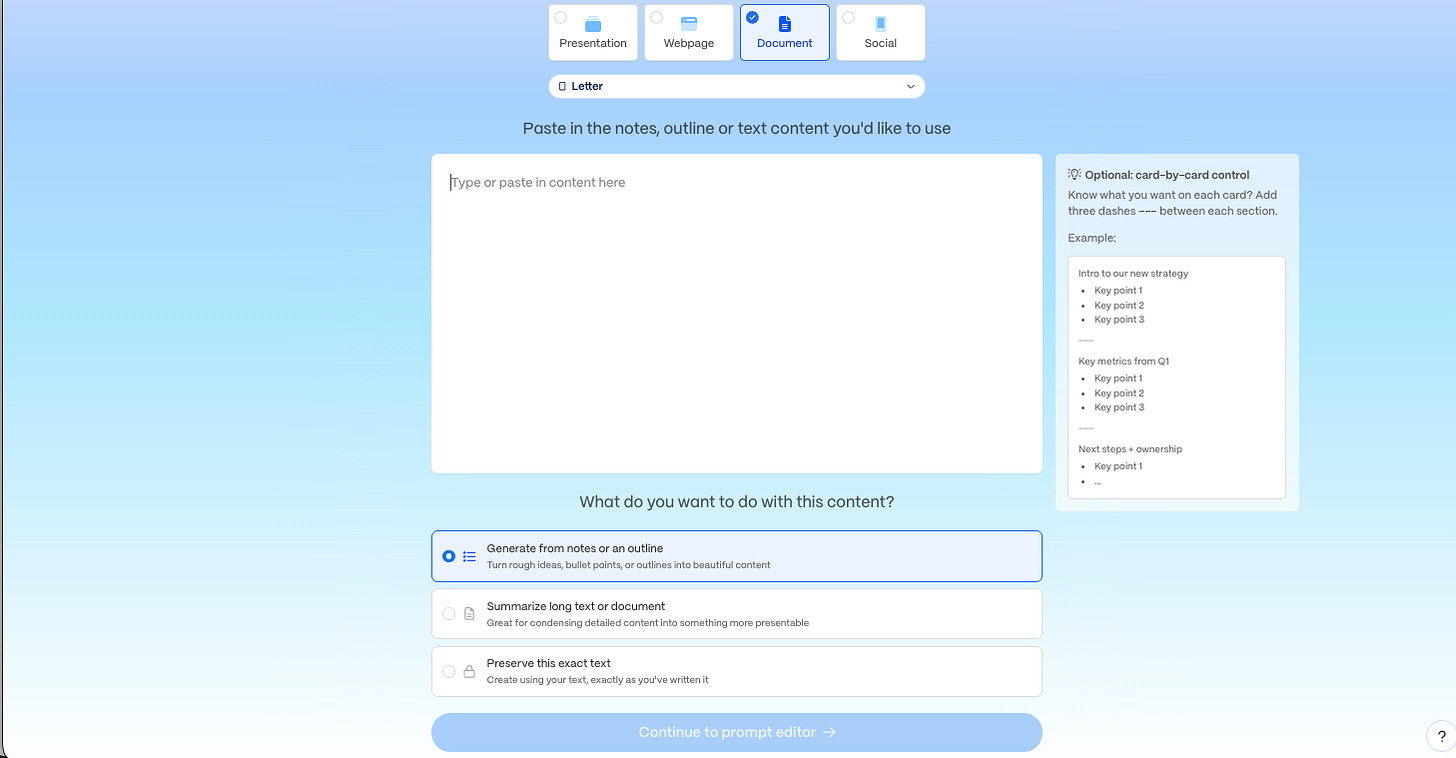
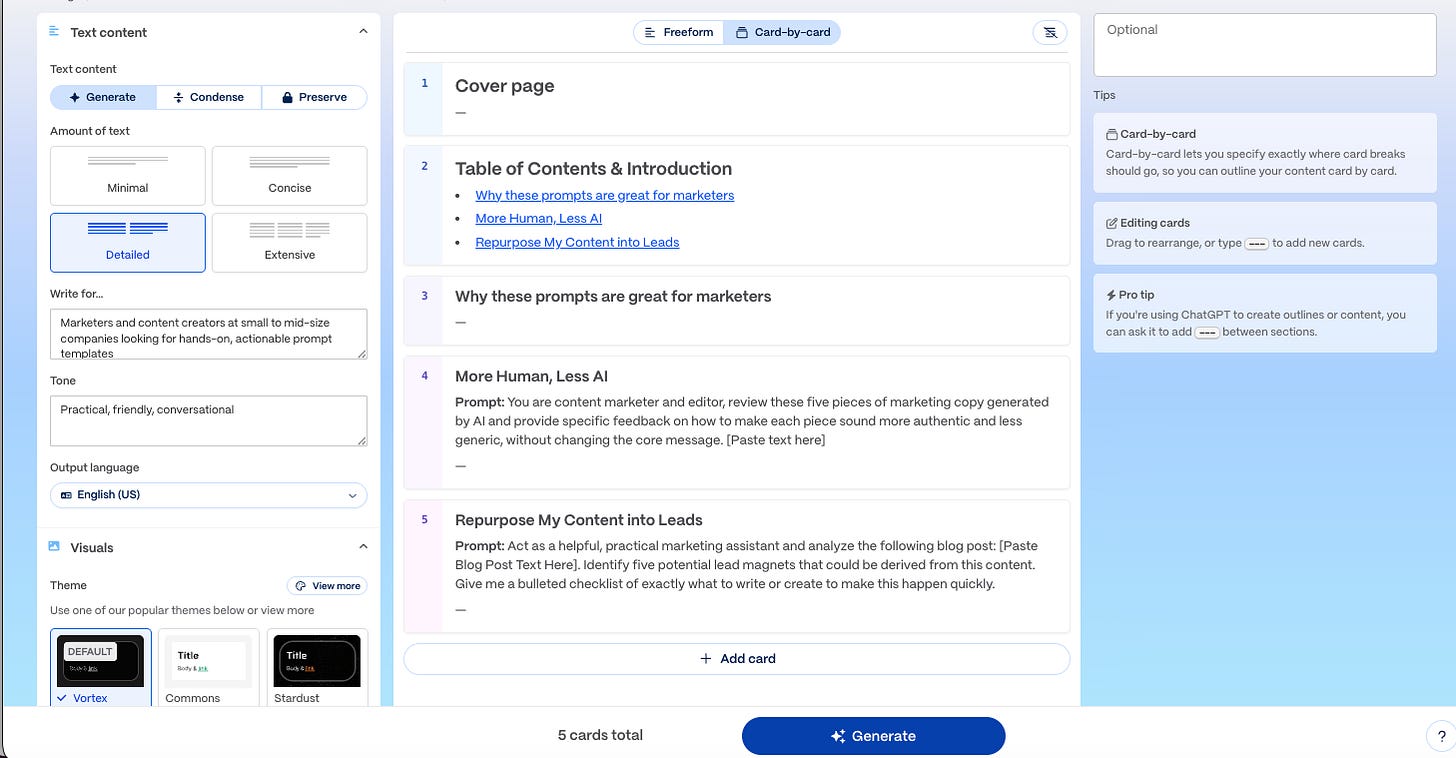
After feeding it my text and asking it to create a document for me with a template I had saved with the right colors and style I wanted, I got a solid first draft.
The output was close to my voice, but not perfect. It needed editing and some layout tweaks, but the first pass was 90% there. What would have been hours of work. Hours. Done in a few minutes. No fussing over layouts or styles or colors. Nearly all the heavy lifting wasn’t just done for me so I could focus on the content. I could focus my energy on the final product, not the things I’d usually struggle with—layout and design.

Once the design and copy were polished, I went back to the personas one last time.
“Remember those prompts I showed you? Here’s the ebook. What do you think?”
One persona—a small business owner who “has” to do marketing for his business—gave okay feedback, but “Millie,” the marketer persona (Millie is really my target audience for this lead magnet)? She loved it. 10 out of 10, no notes.
Step 5: The “Thank You” Bonus
I wasn’t quite done. When someone gives me their email in exchange for something, I think the “Thank You” email back, should always deliver a bonus, a little something extra. Something unexpected and useful.
I have a prompt I’ve been working on that takes any blog post and turns it into a 5-7 slide LinkedIn carousel. It’s really straightforward: hook, background, meat, wrap-up, CTA.
I had Millie simplify my complex prompt into something she would use. Then, I had her generate the instructions for how to use that prompt in Gamma to build the carousel itself.
I drafted the email, put the bonus prompt in, and checked with Millie.
Her verdict? 10 out of 10.
I hadn’t thought of asking my AI persona to rewrite a prompt or instructions for me before and, honestly, the result was way better than I had expected. I think I’m pretty good at writing clear instructions for tech stuff, but this was a whole new level creation.
You can do this too—without the geekiness
It took me longer than it needed to get the lead magnet made because I went down that RAG rabbit hole to deal with my 300+ prompt database. That was a one-time setup cost for me. Next time I have a massive amount of “stuff” (data, content, etc) to work with, or content that is too sensitive to be on the public internet (AnythingLLM and LM Studio keep everything local), I’ll be up and running in a few minutes (I still might get lost in the “which model is best for this…” trap, thank you ADHD).
But to do the same thing yourself, the process is straightforward, and you can do it for any customer-facing material.
- Ask your Personas: Start with your Top of Funnel questions. “You’re just learning about us. What do you need to know?” How I create AI personas will be a topic for another post, but for now start with a prompt that gives the AI grounding who your customer is (needs, pains, goals, etc) and go from there.
- Audit your Assets: Look at your content (blogs, webinars, or slide decks). Find content that answers those TOFU questions to repurpose or use that content as the starting point for something new.
- Generate the Draft: Use your model of choice (use a “thinking” model like ChatGPT 5.1 or Gemini 3.0 or similar for complex reasoning) to draft the content.
- Polish: Use a tool like Gamma to make it look professional. Canva can do this as well. I pay for (and love) Gamma, so that’s my go to.
- Validate: Ask the persona again. “What do you think of this? I’d like your feedback.”
- Iterate: Do what they say until you get that “10 out of 10.”
The hardest part is building the AI persona in the first place. But once you have it, you can build a customer-validated lead magnet in a few hours that you know will resonate, because your ideal customer—virtually speaking—already told you it would.
How long will it take you to make a lead magnet once you have a persona? Maybe an afternoon, a day at most. Think about that for a moment. How long would have it taken you before to:
- find out what content would be interesting for your top of funnel customers
- create that content
- ask customers what they thought about the content
- revise the content
- publish
If you pushed it a week, but you wouldn’t be able to get the “here’s the revisions from that piece I showed you, what do you think?” feedback. Plus the number of people you’d have to ask to get really good feedback and sift through it to get the useful feedback—let’s not go there. It’s more like a month. A month! Is what I have perfect? Probably not. I’ve gotten some good feedback from human “beta” testers, so that’s encouraging, but if it only takes an afternoon to get solid piece to start with and iterate on, well the win is obvious here.
Try this workflow yourself and let me know how it goes in the comments. And if you’d like to get a copy of “5 ChatGPT Prompts That Actually Work for Busy Marketers” for yourself:
Originally published at https://trishusseywriting.substack.com/p/my-ai-enabled-process-to-make-a-marketing